
Call park direct
The call park feature lets you temporarily place a call on hold by assigning it to either a specific user’s extension or a designated call park extension. While the call is parked, you're free to handle other incoming or outgoing calls and use additional phone features without any restrictions.
Two types of call park can be used:
- Call Park Direct - Park a call against a specific user's extension or call park extension.
- Call Park Group - Allows a defined group of users to park calls to available destinations within a configured call park group. These destinations can include member extensions or dedicated call park extensions. View the call park group guide.
Configure call park direct settings
Call park direct does not require any setup before the customer can park a call.
To configure call park groups, follow these steps:
- Log in to User Hub.
- Click Services
- Select Locations > choose a location
- Select Calling
- Navigate to the Calling features settings section
- Select Call park settings.
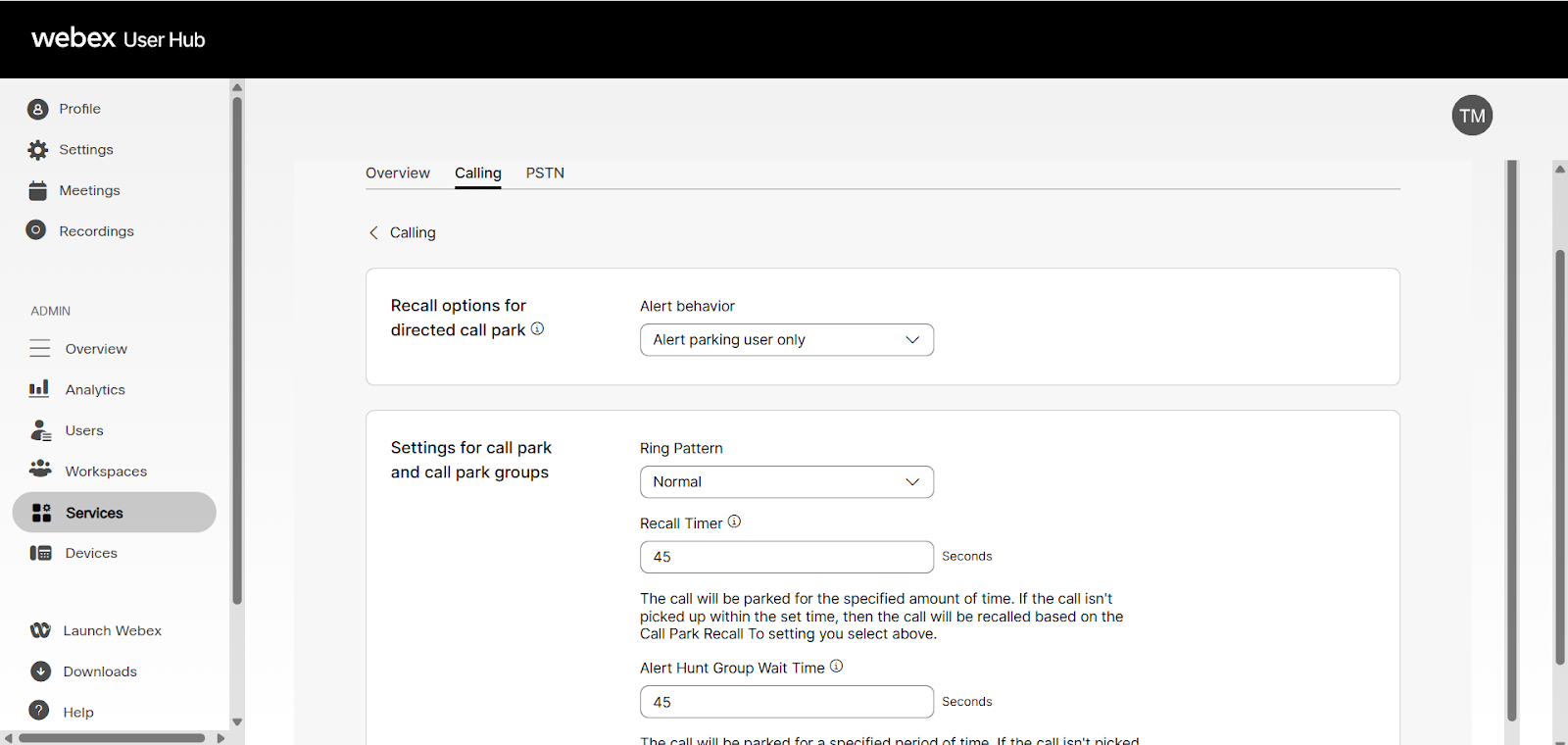
- Configure the call park settings:
- Recall options for directed call park
- Alert parking user only - If a parked call is not picked up, the parked call is recalled back to the user that parked the call initially, after the Recall Timer has lapsed. If the parking user does not pick up the recalled call, and the Recall Timer lapses, the parking user is attempted again in 10 seconds. This process continues until the call is picked up or the caller hangs up.
- Alert parking user first, then hunt group - The user has to select the Hunt Group this setting applies to under Select Hunt Group. If a parked call is not picked up, it is reverted to the person that parked the call, after the Recall Timer has lapsed based on the configured recall time. If the parking user does not pick up, the call is forwarded to the selected Hunt Group after the time setup on the Alert Hunt Group Wait Time setting has lapsed. The call then follows the Hunt Group routing and is not reverted.
- Alert hunt group only - The user has to select the Hunt Group this setting applies to under Select Hunt Group. If a parked call is not picked up after the Recall Timer has lapsed, the call is forwarded to the selected Hunt Group. The call then follows the Hunt Group routing and cannot be reverted.
- Settings for call park and call park groups:
- Ring Pattern - Selects the ring pattern for the reverted parked call to have a distinctive ring to differentiate it from other types of calls.
- Recall Timer - Sets the time, in seconds, that a parked call remains parked before it is reverted to the parking user.
- Alert Hunt Group Wait Time - Sets the time, in seconds, that a parked call remains parked before it is reverted to the Hunt Group after the parking user has first alerted.
- Recall options for directed call park
Feature operation (call park extension with an assigned line key)
When a user is set up to have a call park extension assigned as a line key, the user can simply park an active call by pressing the line key of the call park extension. Once parked, the user hears an announcement confirming that the call is parked. The line key where the call is parked flashes red and displays “Call parked” on the screen.
If multiple users try to park a call against the same extension, one is successful and the others fail. If this happens, the user hears the reorder tone. Choose a different line to park the call. To retrieve the parked call, the user simply presses the line key where the call is parked.
Pick up a parked call
To pick up a parked call:
- Dial *88 from any phone.
The Call Park Pickup feature asks where to retrieve the parked call from. - Enter the extension number of the user or the full 10-digit phone number where the call was parked.
Press #.The call transfers to the phone that dialed *88 from.

