
Overview of BDV with Webex Mobile App
Let’s take a look at some of the main areas of this application on your mobile device:
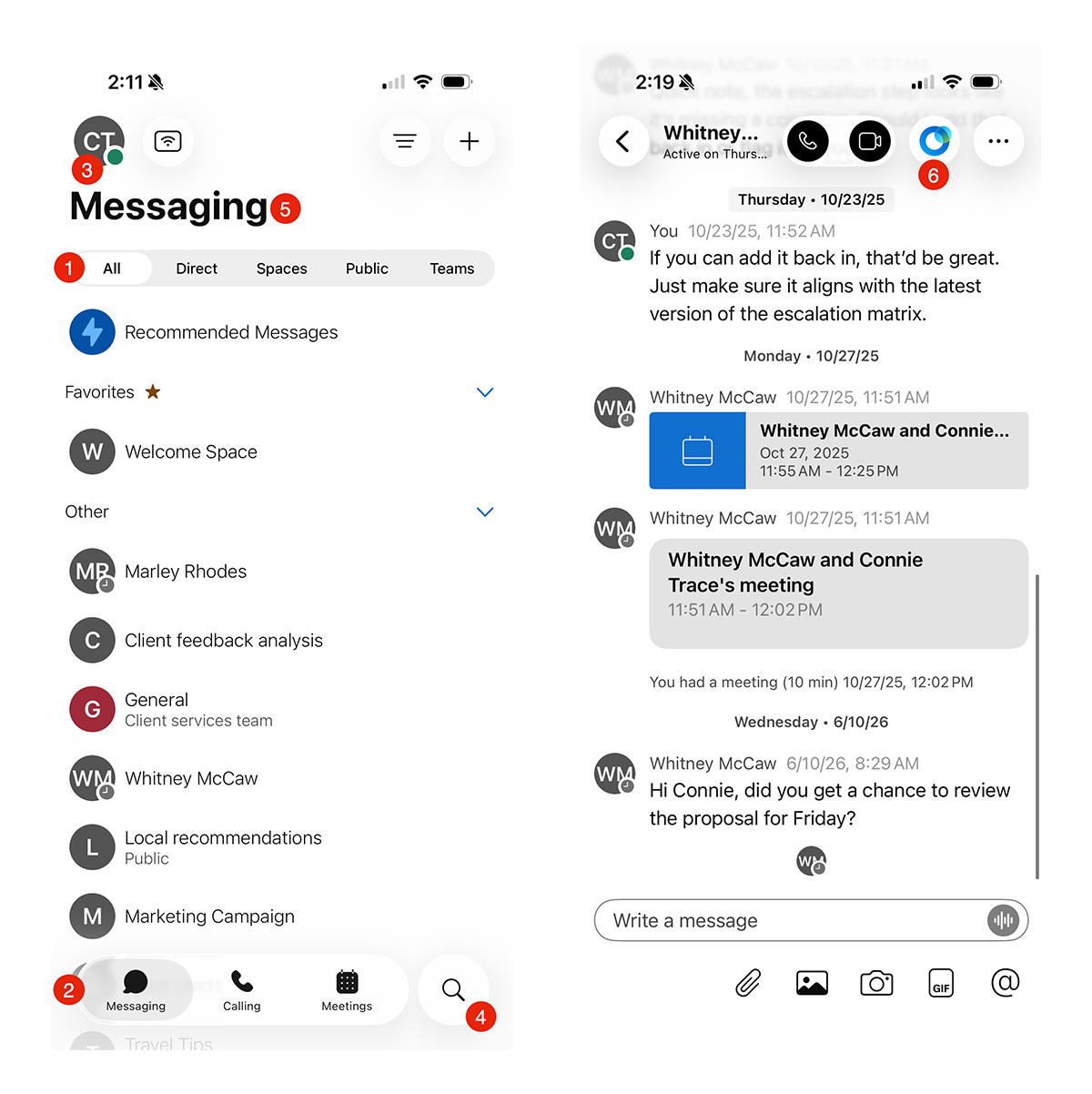
1. People and spaces list
Tap the Messaging tab at the bottom of the screen to see your full list of spaces and direct messages. Your most recent conversations appear at the top, and any space with a new message will show a bold title along with a colored dot.
2. Navigation menu
Use the bottom tab bar to switch easily between your message, call, and meeting views. Tap Messaging, Calling, or Meetings to move between them.
3. Profile and preferences
Tap your profile picture in the top corner of any screen to update your photo or name, adjust settings, or change your availability status.
4. Search
Tap the search icon at the top of the Messaging tab to quickly find people, spaces, or past messages.
5. Messages
Send messages, share files, and collaborate securely with your team, right from your phone.
6. AI Assistance
The AI Assistant is built right into the mobile app, helping you stay productive on the go. It can summarize conversations, surface key details from your messages, and help you tackle routine tasks quickly, so you can connect, collaborate, and communicate effectively from wherever you are.

