
Personal call routing
The personal call routing feature enables admins to set their users’ Webex status to "away" and direct incoming calls to voicemail or a chosen number.
When this feature is turned on, callers also get a greeting explaining the user's availability and return time. Other users in Webex see the “away” status with the reason message and end time.
- Personal call routing is a user feature that can be configured in the following:
- User section of User Hub
- Admin section of User Hub
- Webex Mobile App
- Webex Desktop App
Personal call routing won't take effect while do not disturb, call forwarding always, or call forwarding selective are active.
Configure the personal call routing feature
To configure personal call routing:
- Sign in to User Hub.
- Click Settings
- Click Calling on the top.
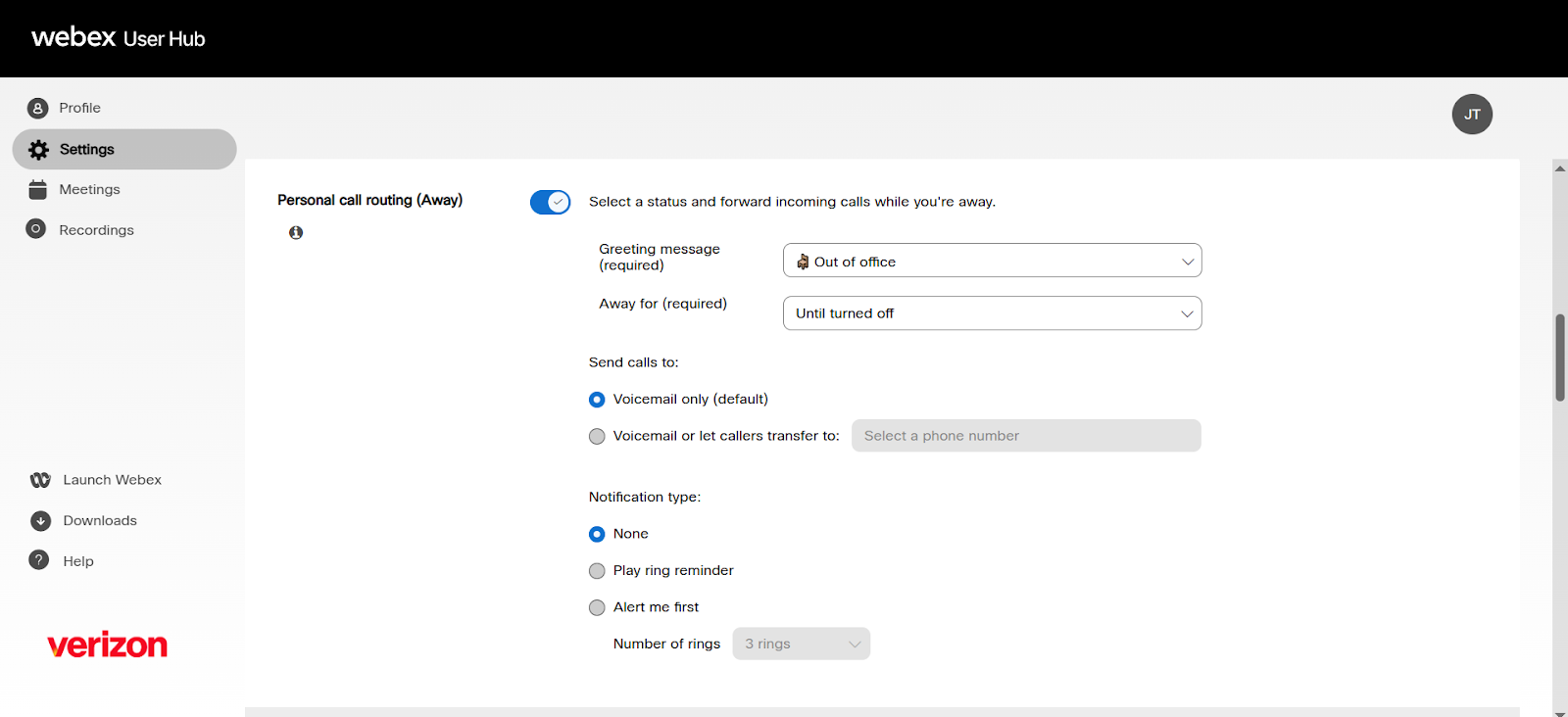
- Select Personal call routing (Away).
- Toggle the Personal call routing (Away) feature to enable it.
- Configure the personal call routing (Away) options:
- Greeting message (required)
- Select the reason for being away.
- Away for (required)
- Set the end time or date for the away message.
- Send calls to
- Voicemail only (default) - Callers are presented with the option to leave a message.
- Greeting message (required)
- Voicemail or let callers transfer calls - Callers are presented with the option to talk to an attendant or leave a message. The admin has to set a user, extension number, or phone number that the call would route to for the attendant.
- Notification type
- None - No ring or reminder on the devices assigned to the user.
- Play ring reminder - Plays a half-ring on the devices assigned to the user.
- Alert me first - Allows the admin to set the number of rings (between 2 and 20 rings) before the call routes to the away message
The admin must set a user, extension number, or phone number that the call would route to for the attendant.
Once enabled, the Voice Portal system plays the away message in the format listed here: Away Message Format
If an away message is set up, it’ll display an alert at the top of the Call settings page to notify the user that this setting is turned on.
Away message format
Callers hear the voice of the Voice Portal system that plays in the following format, based on the setting for Send calls to:
- Voicemail only (default)
- “Name Greeting plays” “Plays Reason” “Plays when the user is back using End date if set” “press 3 or stay on the line to leave a voice message.”
- Option 3 transfers the call to the user’s voice mailbox.
- “Name Greeting plays” “Plays Reason” “Plays when the user is back using End date if set” “press 3 or stay on the line to leave a voice message.”
- Voicemail or let callers transfer calls
- “Name Greeting plays” “Plays Reason” “Plays when the user is back using End date if set” “to be transferred to an attendant press 2, otherwise press 3 or stay on the line to leave a voice message.”
- Option 2 transfers the call to the number the admin set under Transfer call to.
- Option 3 transfers the call to the user’s voice mailbox.
- “Name Greeting plays” “Plays Reason” “Plays when the user is back using End date if set” “to be transferred to an attendant press 2, otherwise press 3 or stay on the line to leave a voice message.”
List of reason messages whenever the voice portal system plays the away message:
{{pcr="/components"}}

