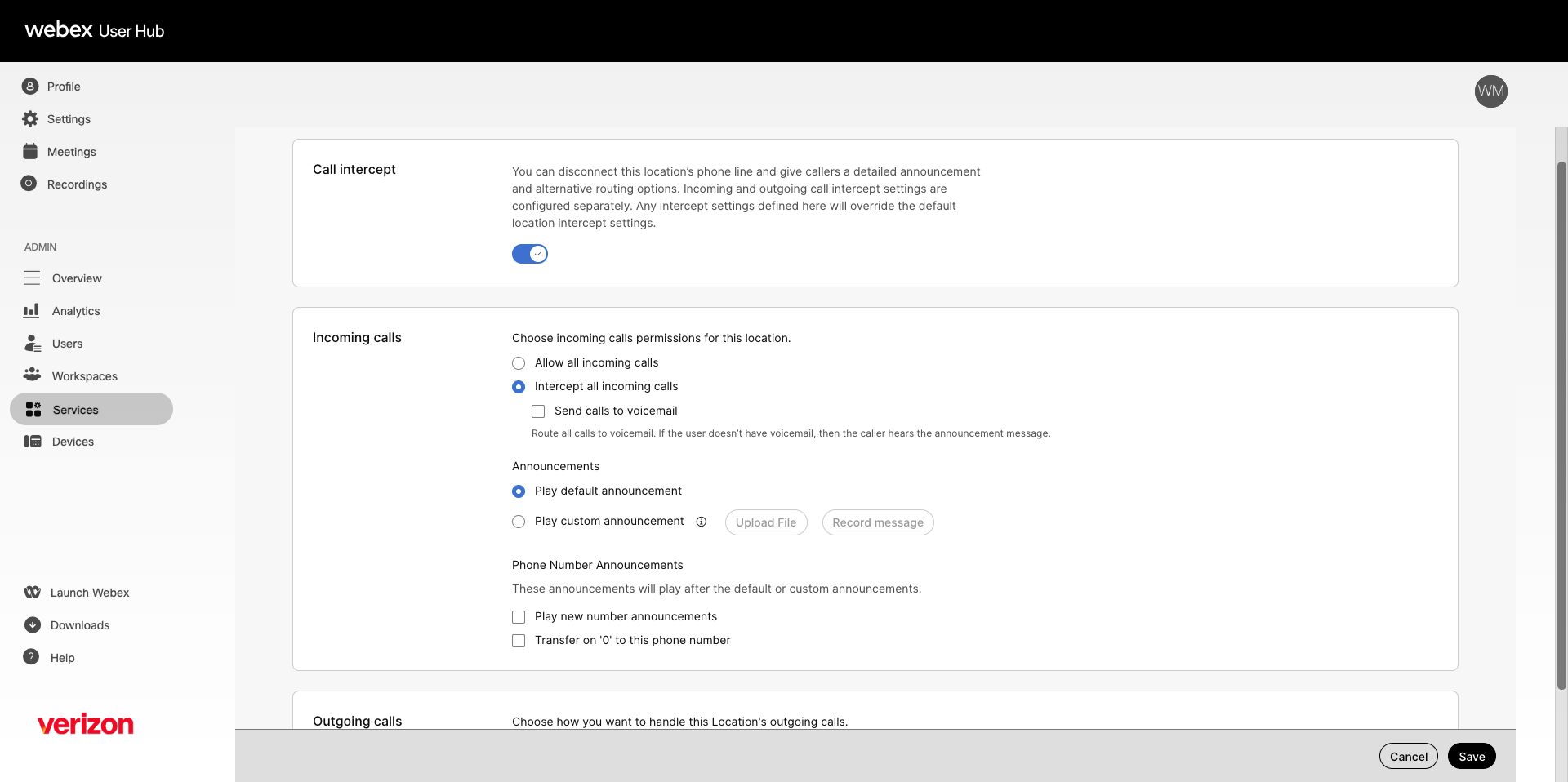
The call intercept feature allows an administrator to take a location's phone line out of service while providing callers with informative announcements and alternative routing options. Incoming and outgoing call intercept settings are configured separately. Any intercept settings defined here override the default location intercept settings.
- Log in to User Hub.
- Under Admin, in the left menu, select Services.
- Select Locations and choose the location you'd like to modify.
- Select Calling.
- Scroll down to Call handling and select Call intercept.
- Select the toggle to enable.
- Choose one of the following options for the location's incoming calls:
- Allow all incoming calls — The location continues to receive calls normally.
- Intercept all incoming calls — All calls to the location are intercepted and routed as defined.
- Send calls to voicemail — Calls are sent directly to voicemail. If the location doesn't have voicemail configured, callers hear the announcement message.
- Under Announcements, choose the announcement type:
- Play default announcement — Plays the system default message.
- Play custom announcement — Select Upload File to upload a pre-recorded audio file, or select Record message to record one directly.
- Under Phone Number Announcements, you can enable the following options. These announcements play after the default or custom announcement.
- Play new number announcements — Plays the configured announcement and announces the new number entered here.
- Transfer on '0' to this phone number — Transfers the caller to the number entered when 0 is pressed.
Note: If both options are checked, you can enter two different numbers for each, but this results in a misleading announcement message. For example, if Play new number announcements is set to 1111 and Transfer on '0' to this phone number is set to 2222, callers hear: "The number you're trying to reach is out of service. The new number is 1111. Press 0 now if you wish to be transferred to the new location." In this case, pressing 0 sends callers to 2222 rather than 1111.
- Next, choose the options for the location's outgoing calls:
- Allow only national outgoing calls — The location can make only national calls and calls to other users within the organization.
- Intercept all outgoing calls — All outbound calls are blocked. A system default message plays indicating calls can't be made.
- Transfer intercepted calls to a phone number — If selected, enter a valid phone number. Any outgoing call from the intercepted location is transferred to the designated number.
- Select Save.