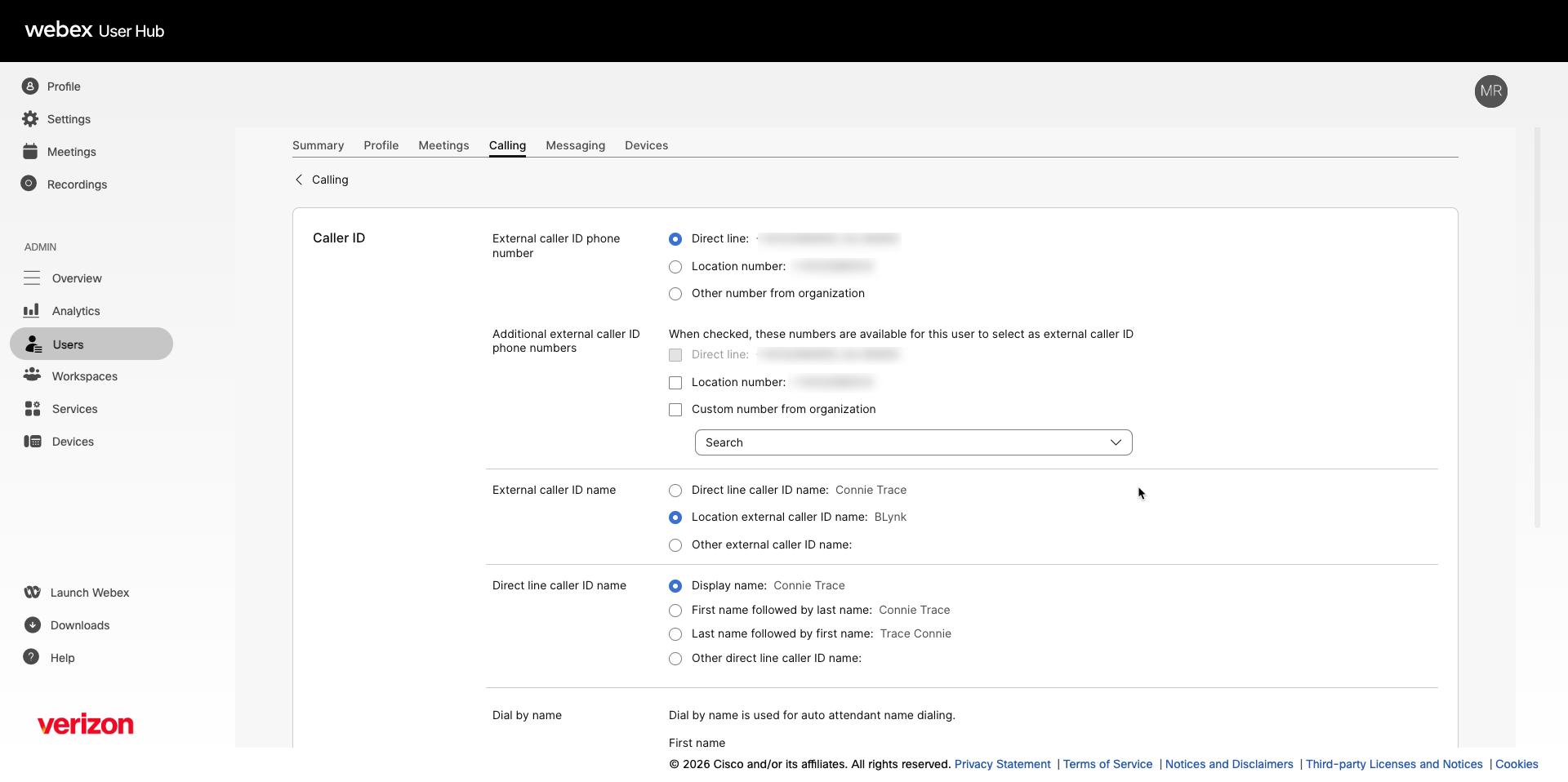
Configure a user’s caller ID
The Caller ID Name configured in the portal is used for internal calls only. To change the Caller ID Name displayed on outbound calls to external numbers, contact Verizon directly to update the outbound caller ID name on your account.
Administrators can modify caller ID settings for users. These settings apply to how the user’s information is displayed when making outgoing calls.
This feature is helpful when, for example, a department like customer service would like all customer service representatives’ caller IDs to display the same information. That way, when a customer tries calling back, they can reach the main customer service number and be routed accordingly — ensuring that the call is received regardless of the original customer service representative’s availability.
Extension-only users inherit the group policy, the calling line ID and the calling line ID group number (also known as main number).
- Log in to User Hub.
- Under Admin, in the left menu, select Users.
- Select the user you’d like to modify.
- Select Calling.
- Under Numbers, select Caller ID.
- Choose which External caller ID phone number is displayed when this user makes an outgoing call:
- Direct line
- Location number - The main number for the location.
- Other number from organization - If you select this option, choose an assigned number from the user’s organization to appear when the user is making outgoing calls.
- Choose which Additional external caller ID phone numbers are displayed for this user to select when they make an outgoing call.
- Direct line - This option is disabled if you’ve already selected the Direct line option above. If the direct line isn't associated with the user, then this option won’t appear.
- Location number - This option is disabled if you’ve already selected the location number option above. If the location has no main number, then this option won’t appear.
- Custom number from organization - This option displays the custom number (both assigned or unassigned) you choose from the drop-down menu. You can add a number from another location with the same PSTN provider, country, and time zone as this user. If you select an unassigned number, the callback to that number isn’t answered.
If you’re a location administrator, only the numbers pertaining to your assigned locations appear in the drop-down menu.
- Choose which External caller ID name is displayed when this user makes an outgoing call:
- Direct line caller ID name
- Location external caller ID name
- Other external caller ID name - If you select this option, enter the name you'd like to appear when making outgoing calls.
- Choose how the Direct line caller ID name is formatted when displayed:
- Display name
- First name followed by last name
- Last name followed by first name
- Other direct line caller ID name — If you select this option, enter the name you'd like to appear
- Under Dial by name, enter the user's First name and Last name. This name is used for auto attendant name dialing, which allows callers to reach the user by spelling their name on the keypad. Note: When adding a user, special characters are supported for the user's first and last name, but they are not supported in the Caller ID names. Unsupported special characters are removed when the Caller ID first and last names are generated.
- (Optional) Select the toggle to Block caller ID for received calls. When enabled, this setting hides the user's identity when they receive a forwarded or redirected call, so the original caller's information is not revealed to the user. For more information, see Block caller ID for forwarded calls.
- Choose one of the following Connected Line Identity for Redirected Calls options to keep the identity of the person receiving the redirected call private.
- Terminating identity - Terminating ID or the final destination ID of the person to whom the call is forwarded is revealed to the caller. This applies to both internal and external calls.
- Example: If A (internal or external caller) calls B, and B forwards the call to C, then C's identity is revealed to A.
- Redirecting identity for external calls - ID of the person to whom the initial call is made is revealed to the caller. This applies only to external calls.
- Example: If A (external caller) calls B, and B forwards the call to C, then only B’s identity is revealed to A and C’s identity isn’t revealed.
- If it’s an internal call, then the final destination ID of the person to whom the call is forwarded is revealed to the caller. Example: If A (internal caller) calls B, and B forwards calls to C, then only C’s identity is revealed to A and B’s identity isn’t revealed.
- Redirecting identity for all calls - ID of the person to whom the initial call is made is revealed to the caller. This applies to both internal and external calls.
- Example: If A (internal or external caller) calls B, and B forwards the call to C, then only B’s identity is revealed to A.
- Terminating identity - Terminating ID or the final destination ID of the person to whom the call is forwarded is revealed to the caller. This applies to both internal and external calls.
- Select Save to save your changes.