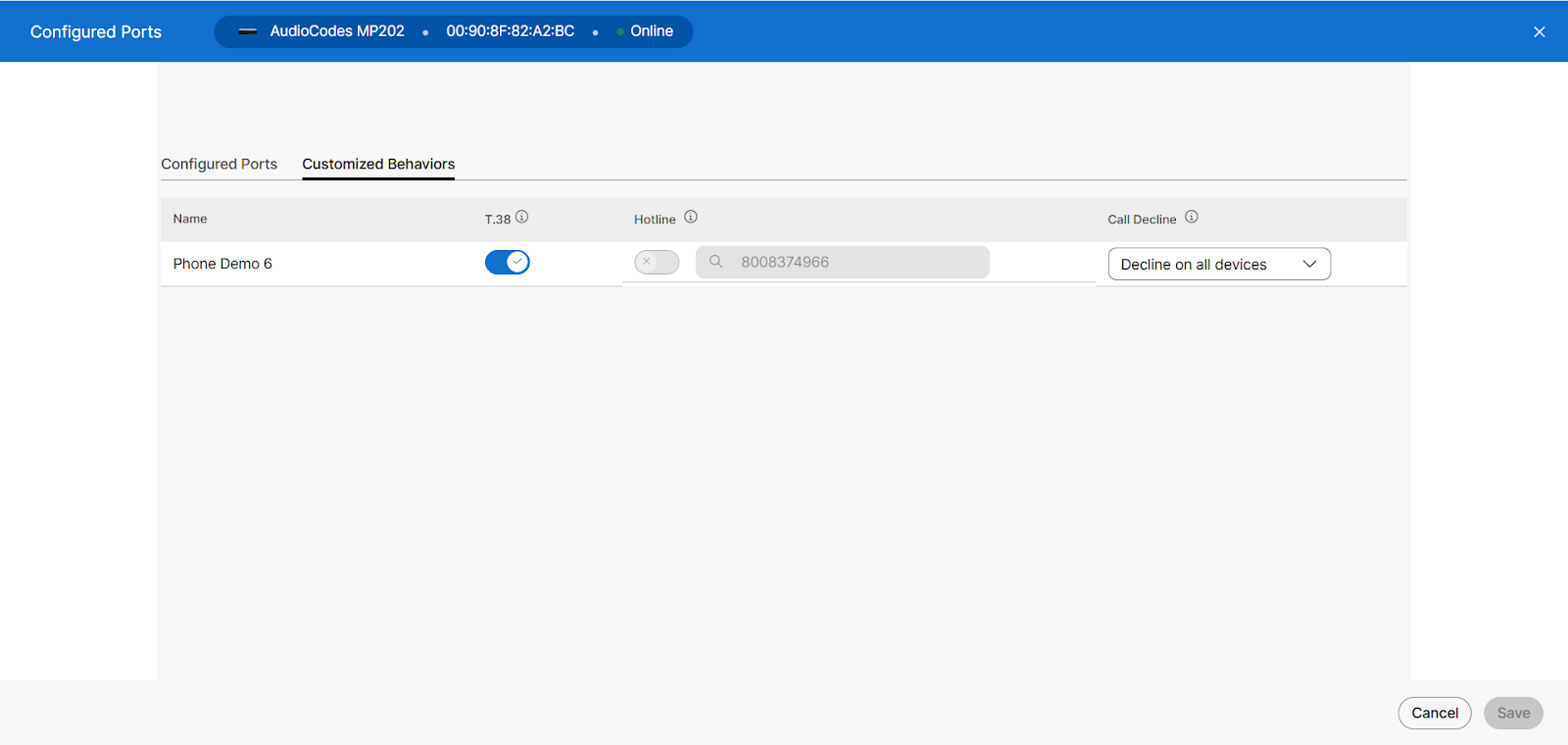
Analog hotline
The Analog Hotline feature, or Private Line Automatic Ringdown (PLAR), programs a port on the Analog Telephony Adapter (ATA) to automatically call a pre-configured phone number when a phone is taken off-hook on an ATA. When this feature is enabled and the caller answers a call on any phone connected to the Analog Telephony Adapter (ATA), the ATA dials out to the phone number configured as the hotline number. Placing outbound calls to any number other than the pre-configured phone number set up on this feature is prohibited. However, calls are received normally.
Note: This feature only works with AudioCodes MP202 and MP204 ATAs. Yealink and Poly phones are not supported with this calling feature. Turning on this feature for any port on the ATA turns off the T.38 setting (if turned on).
Configure analog hotline
To configure the analog hotline feature:
- Log in to User Hub.
- Click Devices.
- Select the Analog Telephony Adapter (ATA) that is being managed.
- Click Configure Ports on the right side.
- Select Customized Behaviors.
- Verify T.38 is turned off (if turning on the Hotline).
- Turn the Hotline setting on or off under the Hotline column for each user being configured.
Note: If turned on, please enter the phone number in the field. - Click Save.
- Reboot the ATA where this feature was configured.